Signal bars tell you almost nothing, so the only lawful way to test whether your phone is being blocked is to measure dBm and RSRP directly. Here is how to read those numbers, rule out physical barriers, and report suspected jamming to the FCC instead of chasing it yourself.
Why Signal Bars Are Misleading and What to Measure Instead
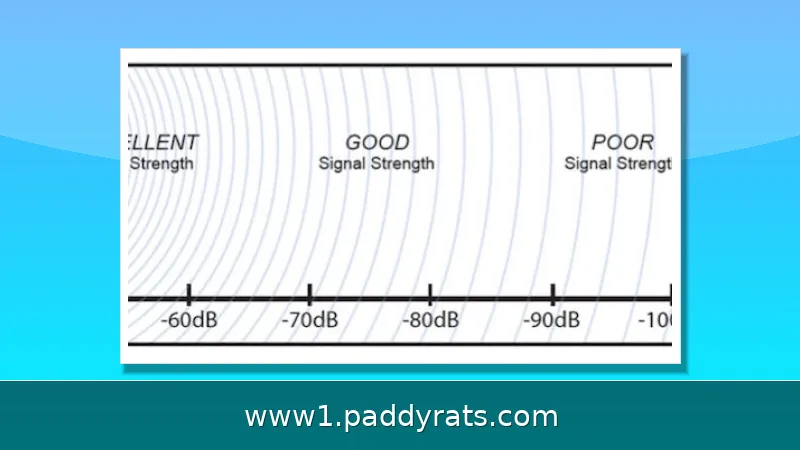
I gave up on the bars on my phone years ago, after watching a "full signal" handset drop a call in a parking garage. Here's the thing: those bars are just a vendor-specific graphic, and there's no industry standard behind them. The same real-world signal can show up as two bars on one carrier's Android build and four on an iPhone running a different iOS version. What actually matters is received power, measured in dBm (decibel-milliwatts), which is an absolute value relative to 1 milliwatt. Networks typically operate somewhere between roughly -30 dBm and -120 dBm, and the closer the number gets to zero, the stronger the signal. Anything better than -85 dBm is generally considered good.
Two units get confused all the time: dB and dBm. A dB is a relative measure of gain or loss, while dBm is an absolute power level tied to a 1 milliwatt reference. On modern LTE and 5G networks, RSRP (Reference Signal Received Power) is the key strength metric. RSSI folds in noise and interference, RSRQ reflects quality, and SINR compares the wanted signal against background noise. If you're diagnosing a possible block, record RSRP in dBm, since that number isolates the carrier signal from everything else happening on the channel.
How to Read dBm and RSRP on iPhone and Android
The fastest lawful way to check your signal is Field Test Mode, a diagnostic tool that's already built into your phone—no app to download, no account, no permission prompts. On an iPhone, turn off Wi-Fi first so you're reading the cellular radio itself and not a Wi-Fi connection. Then open the Phone app, dial *3001#12345#*, and tap Call, which drops you into the FTM Dashboard. From there, open the 5G or LTE menu and look for RSRP, which is reported in dBm. Just keep in mind that not every iPhone model or iOS version exposes this number. Apple uses different chipsets across generations, and carrier configurations can hide the field entirely, so a missing reading doesn't mean something is wrong with your phone. Android takes a more conventional route: turn off Wi-Fi, then go to Settings, About Phone, Status Information (sometimes labeled Mobile Networks), then SIM Card Status, and read the Signal Strength value in dBm. Menu names do shift between manufacturers and Android versions, but the dBm figure is what you're after either way.
When Field Test Mode isn't available—or your particular iPhone model or iOS version just won't show dBm readings—third-party apps can fill the gap. Network Cell Info Lite, which is free on Google Play, displays dBm along with the band, RSRQ, and RSSNR, so you get a fuller picture than a single number can give you. The weBoost App, available on both Google Play and the App Store, keeps things simpler: one tap and you get a dBm reading on a color-coded gauge, which comes in handy when you're walking around a building and don't feel like digging through menus. One caveat worth knowing: the Apple App Store doesn't offer true cellular signal measurement apps, so anything on iOS that claims to measure your radio is actually reading something else—don't trust it for diagnostics. The table below sums up the dBm ranges I use as a quick reference when logging readings around a building.
| dBm Reading | What It Means |
|---|---|
| -30 to -85 dBm | Good signal; calls and data should be reliable |
| -85 to -100 dBm | Usable but weaker; expect occasional drops |
| -100 to -120 dBm | Poor; calls may fail and data will crawl |
What dBm Ranges Actually Mean in Practice
Those raw numbers only do you any good if you can actually make sense of them, so I keep a simple scale in mind whenever I'm walking a site. The thresholds below are the ones booster manufacturers and network engineers tend to cite, and honestly, they match up pretty well with what I've seen on test devices.
| Reading (dBm) | Practical meaning |
|---|---|
| -30 to -70 | Very strong signal, usually near a tower or window |
| -70 to -85 | Good signal, reliable calls and data |
| -85 to -100 | Usable but marginal, dropped calls possible |
| -100 to -110 | Weak, data slows and calls may fail |
| -110 to -120 | Near the edge of service, frequent failures |
Context matters more than any single number. A reading better than -85 dBm is usually a sign of good signal, and anything below -100 dBm points more toward weak coverage or heavy obstruction than an active jammer. That difference isn't just academic, either. One low number on its own tells you almost nothing, since buildings, terrain, weather, and network load can all drag a reading down without anyone interfering with your service. So jot down the exact dBm at each spot you test, along with the time and the band you were connected to, then compare. Does the drop follow you from room to room, or does it hit the same corner every evening around 8 p.m.? That kind of pattern across locations and hours is what separates an ordinary dead zone from something deliberate.
How to Tell Whether a Barrier or a Jammer Is Blocking Your Signal
Timing and location will tell you most of what you need to know, so start by jotting down when and where the problem happens. If it only shows up at certain hours—evenings when everyone in the neighborhood is streaming video, or during a big game or concert that packs a crowd into one area—the likely culprit is network congestion or a seasonal surge overloading tower capacity, not something blocking the airwaves. If the same failure keeps happening at one specific spot with one specific device, though, physical barriers or an obstructed view of the tower are far more likely than interference. Think concrete walls, Low-E glass, or a hill sitting between you and the cell site. A jammer looks different: it tends to cause a sharp, simultaneous drop across multiple carriers and multiple phones in the same area—your phone and your neighbor's phone on different networks failing at once—and ordinary obstructions rarely produce that pattern.
Physical blockers are way more common than most of us assume, and they're usually sitting right in front of us. Concrete, steel, brick, wood, metal panels, fiberglass insulation—they all soak up or weaken radio waves to some extent. Low-E glass with a metal oxide coating is especially rough, since it's built to reflect heat and ends up reflecting cell signals along with it. Mirrors with metallic backing cause the same kind of trouble. So do natural obstacles like mountains, hills, and canyons, plus heavy vegetation; even rain, snow, and fog can wear down reception. Power lines and heavy network traffic pile on their own interference too. Before you jump to dark conclusions, though, start with the simplest suspect: your phone case. A case usually won't block signal unless it has conductive material in it or physically covers the internal antenna, so swapping it out is a cheap, five-minute first test—and one worth doing before you assume anything sinister is going on.
What the Law Says About Cell Phone Jamming
In the United States, the legal picture is refreshingly clear: there is no gray area to work around. The FCC flatly states that cell phone jammers are illegal, and the agency itself handles enforcement through its dedicated Jammer Enforcement program. That prohibition covers more than just flipping a switch on a device—selling, operating, and even marketing a jammer all fall under the ban. Practically speaking, this means you have no lawful path to buying some detection gadget that transmits a signal, and deploying a jammer to "test" your own reception would put you on the wrong side of the law. The rules apply even to government institutions: state prisons cannot block cellphone signals because doing so is illegal, according to reporting on a Bureau of Prisons test of a jamming system at a South Carolina facility. A federal bill co-sponsored by Senator Tom Cotton was introduced to change that, yet the underlying prohibition remains in force today. In short, if you suspect jamming, your role is to measure and document—not to transmit.
Because jamming is illegal, the right move is never to hunt down the source or fight back with a jammer of your own. Start with the basics the FCC recommends: check your device and network settings, toggle airplane mode and the various signal modes, and restart the handset. If readings still collapse across multiple carriers at one spot while nearby areas look normal, that pattern is worth documenting. Note the location, time, and which carriers drop out, then report it to the FCC. Passive measurement with Field Test Mode or a signal app keeps you on the right side of the law; transmitting interference does not.
Common Causes of Blocked Signal and How to Confirm Them
Before you jump to the conclusion that someone is jamming you, work through the ordinary suspects in order. Building materials come first, since concrete, steel, Low-E glass, and similar barriers quietly shave off signal, and simply moving a few feet toward a window often recovers 10 to 20 dBm. Network congestion comes second, and it tends to show up as decent RSRP paired with poor throughput during peak hours, when everyone around you is hammering the same tower. Device issues come third: a low battery reduces the power the phone devotes to hunting for towers, background apps eat into your bandwidth, and an old SIM or a disabled HD Calling feature can mimic a coverage problem. None of these is jamming, yet each leaves a distinct signature when you compare dBm readings across time and place.
A practical confirmation sequence looks like this: measure dBm at the problem spot, walk to higher ground or an open window and measure again, then test a second phone on a different carrier in the same spot. If the second phone also fails and dBm is uniformly terrible, the environment is the cause. If dBm looks healthy but data still fails, congestion or a device setting is the culprit. Only when multiple carriers and multiple devices collapse at one precise location, repeatedly, does illegal jamming become a reasonable hypothesis worth reporting.
What to Do If You Suspect Illegal Jamming
Documentation is your leverage. Record the dBm readings, the carriers affected, the exact address or coordinates, the times of day the failures occur, and whether other people nearby experience the same outage. The FCC's Jammer Enforcement page is the authoritative source on legality and the correct place to file a complaint. Keep your own hands clean: do not buy, import, or operate a jammer, and do not attempt to locate the transmitter by transmitting anything yourself, since that can create its own legal exposure.
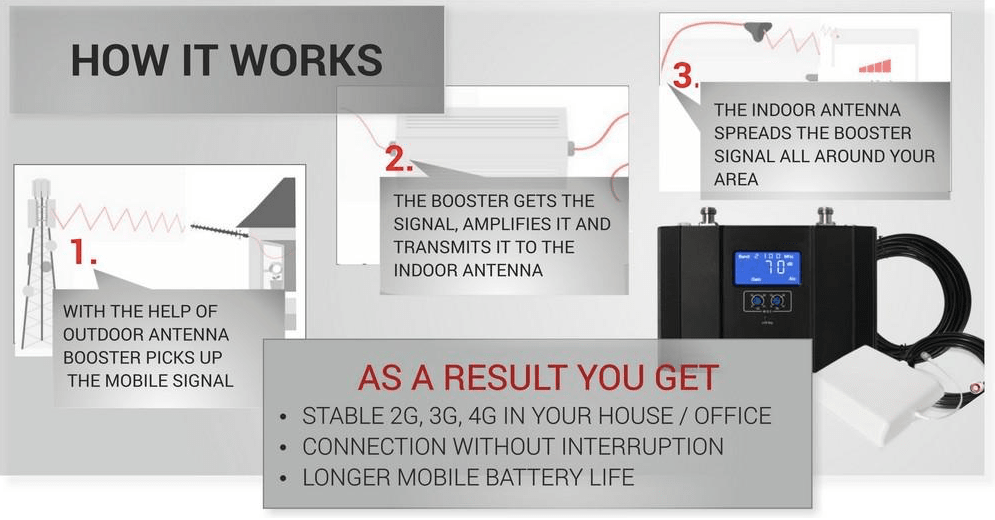
In the meantime, mitigate what you can. Move to higher ground or near an open window, close background apps and uninstall unused ones to free bandwidth, keep the battery charged, and enable HD Calling and Wi-Fi Calling on capable devices. A signal booster or network extender can help, but a booster cannot amplify a signal that is not there; in remote areas, a booster on a tall tower or satellite internet paired with Wi-Fi calling are the realistic options. Booster coverage tiers run from up to 2,500 square feet (good), 4,000 (better), 7,000 (best), 20,000 (excellent), to 100,000 (extreme) for large facilities.
Tools, Apps, and Tower Data That Make Testing Easier
For serious site surveys, professional integrators use a signal meter alongside the Wilson Pro 5G Network Scanner, which maps coverage room by room and produces a report you can hand to a landlord or employer. For consumer-level checks, Antenna Search, Cell Reception, OpenSignal, and RootMetrics help you locate nearby towers and compare carrier performance in your area, which is useful context when a reading looks suspiciously low for your neighborhood.
My working method is simple: log dBm in Field Test Mode or Network Cell Info Lite at three points in the building, compare against the tower map, and repeat at a different hour. That combination of passive measurement and public tower data is enough to distinguish a concrete wall from a genuine interference event, and it keeps the entire investigation on the right side of the law. The full set of authoritative sources behind these figures is listed at the end of this article.
How can I tell if my cell signal is being blocked or jammed?
Measure signal in dBm using Field Test Mode or a signal app instead of relying on bars. If readings drop sharply in one specific spot while nearby areas are normal, and the issue repeats at the same location, a physical barrier or interference source is likely. Jammers are illegal in the US, so report suspected jamming to the FCC.
What dBm reading counts as a good cell signal?
Signal strength is measured in dBm, usually ranging from about -30 dBm to -120 dBm. The closer to zero, the stronger the signal. A reading better than -85 dBm is considered good cell phone signal strength, while very low readings indicate weak coverage or heavy obstruction.
How do I access Field Test Mode on iPhone and Android?
On iPhone, turn off Wi-Fi, open the Phone app, dial *3001#12345#* and press call; look for RSRP in dBm. On Android, turn off Wi-Fi, go to Settings, About Phone, Status or Mobile Networks, then SIM Status and look for Signal Strength.
Are cell phone jammers legal?
No. The FCC states that cell phone jammers are illegal, and jammer enforcement is handled by the FCC. If you suspect jamming, check your device and network settings first, then report the issue to the FCC rather than trying to detect or use a jammer yourself.
Frequently Asked Questions
How can I tell if my cell signal is being blocked or jammed?
Measure signal in dBm using Field Test Mode or a signal app instead of relying on bars. If readings drop sharply in one specific spot while nearby areas are normal, and the issue repeats at the same location, a physical barrier or interference source is likely. Jammers are illegal in the US, so report suspected jamming to the FCC.
What dBm reading counts as a good cell signal?
Signal strength is measured in dBm, usually ranging from about -30 dBm to -120 dBm. The closer to zero, the stronger the signal. A reading better than -85 dBm is considered good cell phone signal strength, while very low readings indicate weak coverage or heavy obstruction.
How do I access Field Test Mode on iPhone and Android?
On iPhone, turn off Wi-Fi, open the Phone app, dial *3001#12345#* and press call, then look for RSRP in dBm. On Android, turn off Wi-Fi, go to Settings, About Phone, Status or Mobile Networks, then SIM Status and look for Signal Strength.
Are cell phone jammers legal?
No. The FCC states that cell phone jammers are illegal, and jammer enforcement is handled by the FCC. If you suspect jamming, check your device and network settings first, then report the issue to the FCC rather than trying to detect or use a jammer yourself.